Bank Offer Not Applied At Checkout: 6 Proven Reasons And Easy Fixes
A bank offer not applied at checkout usually fails for one of six reasons. See where the discount is lost, how to check on screen, and what cannot be fixed.
 Madhammer
October 23, 2026 · 19 min read
Madhammer
October 23, 2026 · 19 min read
A bank offer not applied at checkout is almost never a problem with your bank, and that single misdiagnosis is what most pages on this topic get wrong. They tell you to call customer care, as if the discount were sitting in a queue somewhere waiting to be released. In reality the discount is a conditional rule evaluated by the merchant’s payment page in the two or three seconds between you choosing a card and authorising the payment. If any condition fails at that moment, the rule simply does not fire, and there is no pending state to chase.
What follows is a breakdown of the six places the discount is actually lost, each one visible on your own screen before you pay — plus an honest note on the two cases where nothing can be recovered afterwards.
Table of Contents
The One Thing Most Pages Get Wrong About A Bank Offer Not Applied
The common advice treats a card discount like a refund that got stuck. It is not. An instant bank discount is a rule the merchant’s checkout evaluates in real time, using four inputs: the amount payable at that instant, the payment instrument you selected, the contents of your cart, and the usage history tied to your card for that specific offer. All four are checked together. If one input is wrong, the rule returns nothing — not an error, not a queued request, just silence.
That is why a bank offer not applied to your order so often produces no message at all. You expected a line item reducing the total; instead the total stayed the same and the page moved on. Nothing broke. The condition was evaluated and it failed.
This distinction matters because it changes what you should do. Chasing support after the fact works only in the narrow cases where the merchant’s own system logged an eligible transaction and failed to pass the discount through. In the far more common cases — you were below the threshold after coupons, or you never ticked the offer — there is nothing on the merchant’s side to correct, because from their records the transaction was simply an ordinary one.
It also explains why the same card, same bank and same product can produce a discount on Monday and nothing on Thursday. The offer did not change. Your cart total, your coupon, or the number of times you had already used that card did.
There is a second, quieter reason this confusion persists. The offer banner at the top of a product page and the offer rule inside the payment engine are two different things. The banner is marketing copy shown to every visitor; the rule is arithmetic run against your specific basket and your specific card. Shoppers read the banner as a promise, so when the rule declines, it feels like a broken promise rather than a condition they did not meet.
The six reasons below are ordered roughly by how often they are the real cause. Read them as a diagnostic sequence, not a list of complaints.
Reason 1: Minimum Cart Value Is Measured After Your Coupons
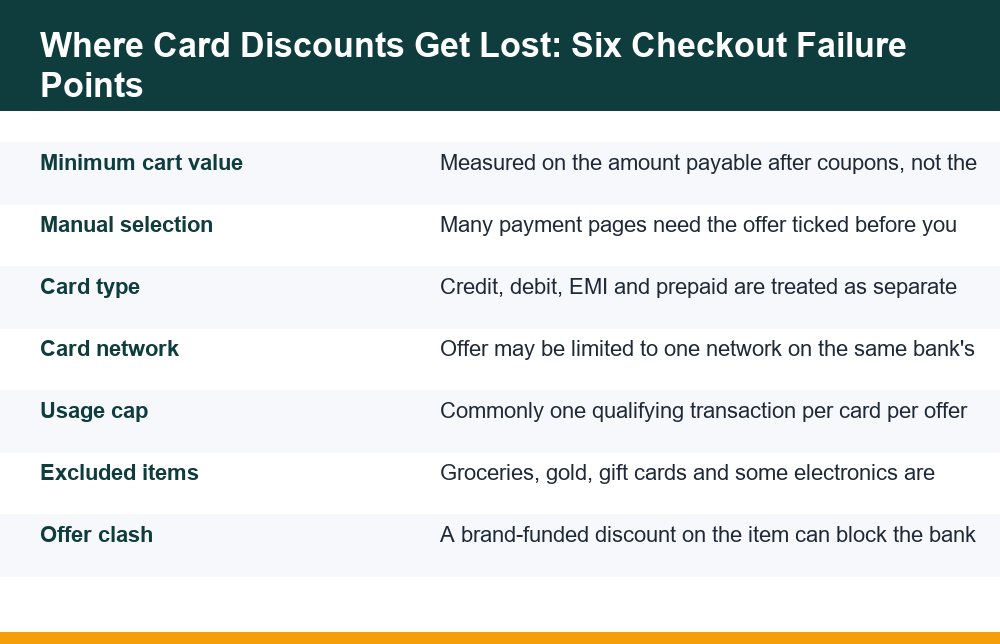
This is the quietest failure and probably the most frequent. An offer says it needs a minimum transaction of a certain amount. Most shoppers read that against the price on the product page. The checkout reads it against the amount that will actually hit the card.
So you apply a site coupon, a promo code, a wallet balance or store credit, the payable total drops below the threshold by a small margin, and the card discount silently stops qualifying. You have traded the larger discount for the smaller one without being told.
The arithmetic is worth doing rather than assuming. A coupon that takes a few hundred rupees off a cart can cost you a card discount worth considerably more, and the checkout will not warn you which combination is better. It applies what you selected.
This sequence — coupon applied, threshold missed, card discount gone — is one of the most ordinary ways a bank offer not applied comes about, and it leaves no trace on screen for you to point at later.
- Note the payable total before adding any coupon or store credit.
- Add the coupon and watch whether the card discount line disappears.
- Compare the two final totals and keep whichever is lower — not whichever has more discounts listed.
- Remember that shipping, handling and platform fees may or may not count toward the minimum; the offer terms decide, and they differ by merchant.
- If the two totals are close, prefer the combination that is already deducted on screen over one that depends on a later credit.
Partial-payment methods cause the same effect. If you pay part of the order with a wallet, gift balance or reward points and the rest with the card, only the card portion is usually assessed against the minimum. Splitting a qualifying order can therefore disqualify it entirely.
Rounding is worth a glance too. Where an offer is written as a percentage of the transaction with a stated floor, the figure the engine uses is the payable amount at that instant, including or excluding fees exactly as the terms define it. A cart that sits a few rupees either side of a threshold is the one most likely to behave differently on two visits, and adding a single low-value item is sometimes enough to put it back above the line.
This is also where the difference between discount formats becomes practical rather than academic. If you are weighing an upfront price cut against a later credit, our breakdown of how instant discounts compare with cashback on the same purchase explains why the two behave very differently when a minimum cart value is in play.
Reason 2: The Offer Has To Be Selected On The Payment Page
A large share of card discounts are not automatic. They are presented as a selectable option on the payment screen — a tick box, a radio button, an “apply offer” link, or a small banner above the card entry fields — and the shopper has to choose it before authorising.
Offer terms are often explicit about this: if the offer is not selected at the payment step, the discount is not extended, and the order is processed at full price. Not selected means not applied. There is no retrospective correction.
The option is easy to miss for three reasons. It appears late, after you have already passed the cart and address steps. It is frequently collapsed behind a heading such as “Offers available” or “View bank offers”. And on mobile it can sit below the fold, under the keyboard, or above a card form that auto-focuses and scrolls past it.
The fix is mechanical. Before entering card details, scroll the entire payment page from top to bottom. Expand every collapsed offers section. If an offer is listed and you believe you qualify, select it and confirm that the order summary total drops before you type the card number — not after, and never after the one-time password screen.
Saved cards add a wrinkle. On some payment pages the offer selection resets when you switch from a saved card to a new one, or when the page reloads after a failed attempt. If a first attempt times out and you retry, treat the second attempt as a fresh page: re-check that the offer is still selected and the total is still reduced.
If the total does not move when you select the offer, stop. That is the page telling you the condition failed, and it is the clearest signal you will get. Paying anyway converts a fixable situation into a closed one.
Reason 3: Card Type And Network Mismatch
“Bank offer” is loose language. The actual eligibility is usually narrower than the bank’s name on the banner, and the narrowing happens along two axes at once.
The first is instrument type. Credit cards, debit cards, credit card EMI, debit card EMI and prepaid or corporate cards are treated as separate eligibilities, even when issued by the same bank to the same person. An offer valid on credit cards very often excludes debit cards, and an offer valid on EMI transactions may not apply to a single full payment on the same card.
The second is network. The same bank issues cards on different networks, and an offer can be funded in partnership with one network only. Two cards, one bank, one shopper — and only one of them qualifies.
| Variable | What shoppers assume | How checkout actually reads it |
|---|---|---|
| Instrument | “My bank’s card” | Credit, debit, EMI and prepaid are distinct categories |
| Network | Irrelevant | May be restricted to a single card network |
| Card variant | All cards of that bank | Specific card families or ranges can be excluded |
| Issuer vs co-brand | Same thing | Co-branded cards may be governed by a different offer entirely |
| Payment route | Card is a card | A card paid through a wallet or third-party app can be read as a different instrument |
Checking this takes seconds. The offer terms list the eligible instruments and networks; your card shows its network on the front and its type on the statement or app. If the two do not match exactly, the discount was never available to you, and no amount of retrying will change the outcome.
The payment route in the last table row catches people more often than the others. Adding the same card inside a wallet or a third-party payment app and paying through that app can present the transaction differently to the merchant than entering the card directly on the checkout page. Where an offer names the card, paying the card directly is the safer reading of the terms.
EMI adds a further wrinkle, because an EMI-linked offer changes what you actually pay in ways the headline does not show. If you are considering that route, read our breakdown of the charges that sit inside a no-cost EMI plan before assuming the discounted EMI total is the cheapest option on the page.
Reason 4: One Qualifying Transaction Per Card
Most card offers carry a usage cap, and the most common cap is one qualifying transaction per card for the offer period. Some are stricter — one per customer, one per account, or one per month — and the cap is typically tracked at the card level rather than the login level.
This produces a specific and confusing pattern. The offer banner is still displayed on the page, because the banner is shown to everyone. The discount simply does not apply to you, because your card has already consumed its one use. Nothing on screen says “already used”.
When the cap is the reason a bank offer not applied shows up on your order, the page gives you no signal at all — which is exactly why this one is so often misread as a technical fault.
Three situations trip people up here:
- A cancelled or returned order may still count against the cap, depending on the terms, so a purchase you no longer own can block the next one.
- Multiple logins or accounts do not reset the cap, because the cap follows the card, not the account.
- Adding a second card to the same order does not stack the offer; checkout almost always applies one card offer per transaction.
- A failed or abandoned attempt occasionally reserves the use for a short window, so an immediate retry can behave as though the cap is already spent.
There is also a separate cap most shoppers never read: the maximum discount amount. An offer advertised as a percentage usually carries a rupee ceiling, so on a large order the discount stops growing. That is not a failure — it is the offer working as written — but it reads as a malfunction when the shopper expected the percentage to scale.
The offer period itself is a third limit hiding in plain sight. Many offers run on specific dates, specific days of the week, or within stated hours, and the engine uses the timestamp of the payment rather than the moment you added the item to the cart. A cart built on the last evening of an offer and paid for a few minutes after midnight is no longer the same transaction as far as the rule is concerned.
If you suspect the cap is the cause, the honest answer is that there is no fix for this order. Using a different eligible card is the only path, and only if you hold one.
Reason 5: The Product Sits In An Excluded Category
Offer terms carry an exclusion list, and the list is longer than most shoppers expect. Exclusions exist because margins in some categories cannot absorb a funded discount, so those categories are carved out before the offer goes live.
Commonly excluded: gold, silver and jewellery; gift cards and digital vouchers; grocery and daily essentials; fuel and utility payments; insurance and financial products; mobile recharges; certain premium electronics and newly launched models; and anything sold by specific third-party sellers on a marketplace.
The seller dimension is the one that catches careful shoppers. On a marketplace, the same product listing can be fulfilled by different sellers, and a card offer may be funded only for orders sold by particular sellers. Switching sellers on an otherwise identical item changes eligibility.
Mixed carts behave in a way that surprises people too. If your cart contains one eligible item and one excluded item, the checkout may compute the minimum transaction value on the eligible portion only — which can push you below the threshold even though the cart total looks comfortably above it. Buying the two items as separate orders sometimes produces a better outcome than buying them together, which is the opposite of what shoppers assume.
Exclusion wording is also worth reading literally rather than by category instinct. Terms that exclude “gift cards and vouchers” usually mean any stored-value product, including a digital code delivered by email. Terms that exclude “select models” mean the merchant holds a list you cannot see, so the only reliable test is the screen itself.
Two quick tests isolate an exclusion without reading the full terms:
- Remove the suspect item, keep the cart above the stated minimum, and see whether the discount line appears.
- If it does, add the item back as a separate order and check whether that order qualifies on its own.
Whichever way it resolves, do the test before you pay rather than after. An exclusion identified at the summary stage costs you thirty seconds; the same exclusion identified from a card statement costs you the discount.
Reason 6: A Brand-Funded Discount Is Already On The Item
The sixth reason is the least documented and the hardest to see. Discounts have funders. A price cut can be funded by the brand, by the seller, by the marketplace or by the card issuer, and two funded discounts on the same unit are frequently mutually exclusive.
So when an item is already carrying a brand-funded promotion — a launch price, an exchange bonus, a bundled accessory, a limited-period drop — the card offer may be blocked on that specific listing even though the offer is live across the rest of the site. The item is not ineligible by category. It is ineligible because the discount budget on it is already spent.
A bank offer not applied to one unusually cheap item, while applying normally to its neighbours in the same category, is the clearest signature of a funding clash rather than a fault.
Exchange and trade-in flows deserve a separate mention, because they change the payable amount as well as the funding. An exchange value is deducted before payment, which can simultaneously consume the item’s discount budget and drop the payable total below the offer minimum. Two of the six reasons in this breakdown can therefore fire at once on the same order, which is why the discount can vanish even when you were careful about the threshold.
It also explains why waiting does not always help. Once a brand-funded promotion ends, the card offer may become available again — but the base price will have gone back up, and the net payable can land in the same place or higher. The only reliable comparison is the final amount payable under each combination, which is why it is worth checking the total twice rather than counting discount lines.
None of the six reasons above is recoverable by arguing. Five of them are avoidable by looking at the right number before you authorise, and that is the whole point of the checklist below.
The Thirty-Second Check Before You Authorise Payment
Everything above collapses into one habit: confirm the discount has already been deducted from the order summary before you enter card details. If the number has not moved, the offer has not applied, and pressing on will not change that.
Almost every case of a bank offer not applied is visible on the payment screen a few seconds before the money leaves, which is the only point at which the outcome is still yours to change.
- Open the full offer terms and note the minimum transaction value, eligible instrument, eligible network, usage cap and maximum discount.
- Confirm your card matches the instrument and network exactly — credit versus debit, and the network printed on the card.
- Scroll the entire payment page and expand every collapsed offers section before touching the card fields.
- Select the offer manually if a selection control exists, then re-read the order summary.
- Check that the payable total has dropped by the expected amount and that a named discount line is visible.
- Re-check the total after applying any coupon or store credit, because the minimum is assessed on what is payable, not on list price.
- Screenshot the order summary showing the discount line, the payable total and the offer name, then authorise.
That screenshot is the single most useful thing you can do, and almost nobody does it. It is the difference between a support conversation with evidence and one without. Capture the summary page, not the confirmation email, because the email often shows only the final amount charged.
Keep the card statement entry too, once it posts. For an instant discount the charged amount should already be net of the discount; a full-price charge with a discount shown on screen is one of the few genuinely raisable discrepancies.
One habit is worth adding for high-value orders: write down the two candidate totals before you commit. Total A is the payable amount with the coupon and no card discount; total B is the payable amount with the card discount and no coupon. Paying the lower of the two is the entire decision, and it takes longer to describe than to do.
If instead you were promised a credit that was supposed to arrive later and it never did, that is a different problem with a different resolution path — our notes on what to do when a promised cashback never arrives cover the timelines and the evidence that actually matters there.
What Is Recoverable After The Order Is Placed, And What Is Not
Here is the part most pages avoid. Once payment is authorised, a bank offer not applied to that transaction is usually final. The order was processed at the price the checkout computed, and that computation is the record.
There are narrow exceptions. If your screenshot shows a discount line in the order summary and the amount actually charged was the undiscounted total, that is an inconsistency inside the merchant’s own records and is worth raising. Likewise if the discount was described as applying automatically, with no selection control anywhere on the payment page, and the terms you can still read confirm it. In both cases you are pointing at a contradiction, not asking for a favour.
The two cases where nothing can be recovered, and it is dishonest to pretend otherwise, are these. First, where the offer required manual selection and you did not select it — offer terms commonly say outright that the discount will not be extended in that situation. Second, where your card had already consumed its one qualifying transaction. In both, the merchant’s records show an ordinary transaction, and there is no eligible discount to release.
If you do raise it, keep the request narrow and factual: order number, offer name as displayed, screenshot of the summary, amount charged. Ask whether the offer was recorded as applied on that order. A short specific question gets a usable answer far more often than a general complaint about a missing discount.
Write to the merchant rather than the bank first, in almost every case. The merchant’s checkout computed the amount, so the merchant holds the record of whether the offer fired. A card issuer can confirm what was charged, but it cannot retroactively create a discount it never funded for that order.
If a merchant has clearly charged more than the amount displayed on the summary and will not engage, India has a government-run consumer help resource for recording complaints of that kind — the National Consumer Helpline portal run by the Department of Consumer Affairs describes how complaints are registered and routed to companies. Treat that as a last step, not a first one, and only where the charge genuinely differs from what the screen showed.
The realistic takeaway is unglamorous: this is a checkout-reading problem, not a support problem. Thirty seconds on the payment page is worth more than thirty minutes afterwards.
Frequently Asked Questions
Why is my bank offer not showing at checkout?
Usually because one eligibility condition is failing silently. The most common causes are a payable total that fell below the minimum after a coupon, a card type or network that does not match the offer’s terms, an item in an excluded category, or a card that has already used its one qualifying transaction. The banner stays visible to everyone, so its presence is not confirmation that you qualify.
Can a bank offer be applied after placing the order?
In most cases, no. An instant discount is computed at the moment of payment, so a bank offer not applied at that moment is effectively final and there is no pending discount to release later. The narrow exception is a genuine inconsistency — your order summary showed a discount line but the amount charged was the full price. That is worth raising with the order number and a screenshot. Where the offer simply was not selected, offer terms commonly state the discount will not be extended.
Why does the discount disappear when I add a coupon?
Because the minimum transaction value is measured on the amount actually payable, not on the listed price. A coupon lowers the payable amount, and if that takes you below the threshold the card discount stops qualifying. Compare the two final totals rather than counting discount lines — the smaller coupon can quietly cost you the larger card discount.
How many times can one card be used for the same bank offer?
Most offers allow one qualifying transaction per card for the offer period, though some permit one per month and others cap it per customer or per account. The cap is tracked against the card, so using a different login does not reset it. Cancelled or returned orders may still count against the cap depending on the terms.
Does the minimum order value include delivery charges?
It depends entirely on the offer terms, and merchants differ. Some assess the minimum on the product subtotal before shipping, handling and platform fees; others use the full payable amount. Never assume. Read the stated minimum, then watch whether the discount line appears in the order summary before you enter card details — the page itself is the most reliable answer.
Which products are excluded from bank card offers?
Exclusion lists vary, but gold and jewellery, gift cards and digital vouchers, groceries and daily essentials, fuel and utility payments, insurance and financial products, mobile recharges, and certain premium or newly launched electronics are commonly carved out. On marketplaces, eligibility can also depend on which seller is fulfilling the order. To test it, remove the suspect item and see whether the discount reappears.
{"@context": "https://schema.org", "@type": "FAQPage", "mainEntity": [{"@type": "Question", "name": "Why is my bank offer not showing at checkout?", "acceptedAnswer": {"@type": "Answer", "text": "Usually because one eligibility condition is failing silently. The most common causes are a payable total that fell below the minimum after a coupon, a card type or network that does not match the offer's terms, an item in an excluded category, or a card that has already used its one qualifying transaction. The banner stays visible to everyone, so its presence is not confirmation that you qualify."}}, {"@type": "Question", "name": "Can a bank offer be applied after placing the order?", "acceptedAnswer": {"@type": "Answer", "text": "In most cases, no. An instant discount is computed at the moment of payment, so a bank offer not applied at that moment is effectively final and there is no pending discount to release later. The narrow exception is a genuine inconsistency — your order summary showed a discount line but the amount charged was the full price. That is worth raising with the order number and a screenshot. Where the offer simply was not selected, offer terms commonly state the discount will not be extended."}}, {"@type": "Question", "name": "Why does the discount disappear when I add a coupon?", "acceptedAnswer": {"@type": "Answer", "text": "Because the minimum transaction value is measured on the amount actually payable, not on the listed price. A coupon lowers the payable amount, and if that takes you below the threshold the card discount stops qualifying. Compare the two final totals rather than counting discount lines — the smaller coupon can quietly cost you the larger card discount."}}, {"@type": "Question", "name": "How many times can one card be used for the same bank offer?", "acceptedAnswer": {"@type": "Answer", "text": "Most offers allow one qualifying transaction per card for the offer period, though some permit one per month and others cap it per customer or per account. The cap is tracked against the card, so using a different login does not reset it. Cancelled or returned orders may still count against the cap depending on the terms."}}, {"@type": "Question", "name": "Does the minimum order value include delivery charges?", "acceptedAnswer": {"@type": "Answer", "text": "It depends entirely on the offer terms, and merchants differ. Some assess the minimum on the product subtotal before shipping, handling and platform fees; others use the full payable amount. Never assume. Read the stated minimum, then watch whether the discount line appears in the order summary before you enter card details — the page itself is the most reliable answer."}}, {"@type": "Question", "name": "Which products are excluded from bank card offers?", "acceptedAnswer": {"@type": "Answer", "text": "Exclusion lists vary, but gold and jewellery, gift cards and digital vouchers, groceries and daily essentials, fuel and utility payments, insurance and financial products, mobile recharges, and certain premium or newly launched electronics are commonly carved out. On marketplaces, eligibility can also depend on which seller is fulfilling the order. To test it, remove the suspect item and see whether the discount reappears."}}]}