Failed UPI Payment Refund: 5 Essential Timelines And What To Do Next
A failed UPI payment refund can take hours or days, and the reason is which leg broke. Five cases, realistic waits, and the details that move a stuck case.
 Madhammer
October 23, 2026 · 20 min read
Madhammer
October 23, 2026 · 20 min read
A failed UPI payment refund is, in the overwhelming majority of cases, automatic: the money that left your account returns to the same account without you filing anything, and the only real variable is how long that takes. The trouble is that the waiting period quoted online is never the same twice. One bank help page says T+1 working day. A payment app says 24 to 48 hours. A news explainer says one to three working days. A lender’s blog says three to five.
None of them is inventing numbers, and none of them is complete, because the window depends entirely on which part of the transaction broke. This breakdown maps the five cases, gives the realistic wait for each, and sets out exactly what to collect before you contact anyone — because the detail that actually moves a stuck case is almost never the screenshot most people send first.
Table of Contents
Failed UPI Payment Refund: The Short Answer
If your account was debited and the payment screen showed a failure, you do not normally have to request anything. The reversal is generated by the system that recorded the failure, and it posts back to the same account and the same card or balance it came from. You cannot redirect it, speed it up by retrying, or have it sent to a different account.
The practical expectation, stated honestly:
- Most simple person-to-person failures reverse the same day, often within minutes to a few hours, because the failure is detected on the spot.
- Anything that needed a downstream rejection message waits for that message, which can mean one to two working days.
- Anything involving a merchant, a wallet balance or a recurring mandate has an extra ledger in the chain, and extra ledgers add days, not hours.
- Working days are not calendar days. A failure late on a Friday with a Monday holiday behind it can look stuck for four days and still be perfectly normal.
- No date is a promise. Any page that tells you a specific calendar date your money will arrive is guessing.
A failed UPI payment refund is a reversal rather than a fresh payment, and it looks like one on the statement: a credit line matching the earlier debit to the paisa, usually carrying a reference in the narration and sometimes value-dated back to the day of the original attempt. That last detail catches people out. The credit can sit above the debit in a date-sorted list, or carry a date earlier than the day you actually noticed the balance change, so scanning the top of the statement for a recent entry can miss it entirely. Match on the amount and the reference, not on position in the list.
The single most useful thing you can do in the first hour is nothing at all except check your bank statement rather than the app. The app shows its own view of the transaction; the statement shows what your bank’s ledger actually did. Those two disagree more often than people expect, and acting on the wrong one is how a straightforward case turns into a week of back-and-forth.
Why Every Page Quotes A Different Window
A UPI transfer is not one event. It is a short chain of handoffs, and each link can fail independently. The refund clock does not start when you see the error on screen. It starts when the link that broke reports back.
Laid out in order, the chain looks like this:
- Your app builds the instruction and hands it to the bank holding your account.
- Your bank checks the balance and the applicable limits, and posts the debit.
- The central switch routes the message onward to the institution holding the payee’s account.
- The receiving bank either accepts the credit or declines it and generates a return message.
- A payment service provider and the merchant’s own ledger, where a business is on the far end, sit beyond all of that and keep their own record of the same event.
That chain is why the published numbers diverge. A help page written by a bank describes what the bank can see and commits to, so it quotes T+1 working day. A payment app describes what it can see, so it quotes 24 to 48 hours. A merchant’s policy page describes its own approval step and quotes three to five days. Each figure is true for one leg and misleading for the others, which is why no single published number can honestly describe a failed UPI payment refund in general.
Two mechanics explain most of the long waits. First, some failures are only discovered during end-of-day reconciliation, when the two sides compare their records; if the mismatch surfaces in that batch rather than live, you are already into the next working day. Second, every additional party holding a balance adds its own cycle — a merchant has to confirm the order was cancelled before its provider will push the reversal, and that confirmation is a human process with business hours.
There is a third, duller factor worth naming: batch systems are tuned for volume, not for individual urgency. The same architecture that moves enormous numbers of transfers reliably also means an exception sits in a queue alongside every other exception from that window. Nothing about your particular case moves it up that queue, which is the honest reason why a polite follow-up on day one changes nothing while a well-documented follow-up after the window changes a great deal.
Working out which leg broke is therefore the whole task. It tells you what the realistic wait is, who can actually see your case, and whether there is anything worth doing at all.
The Five Cases And The Realistic Wait For Each
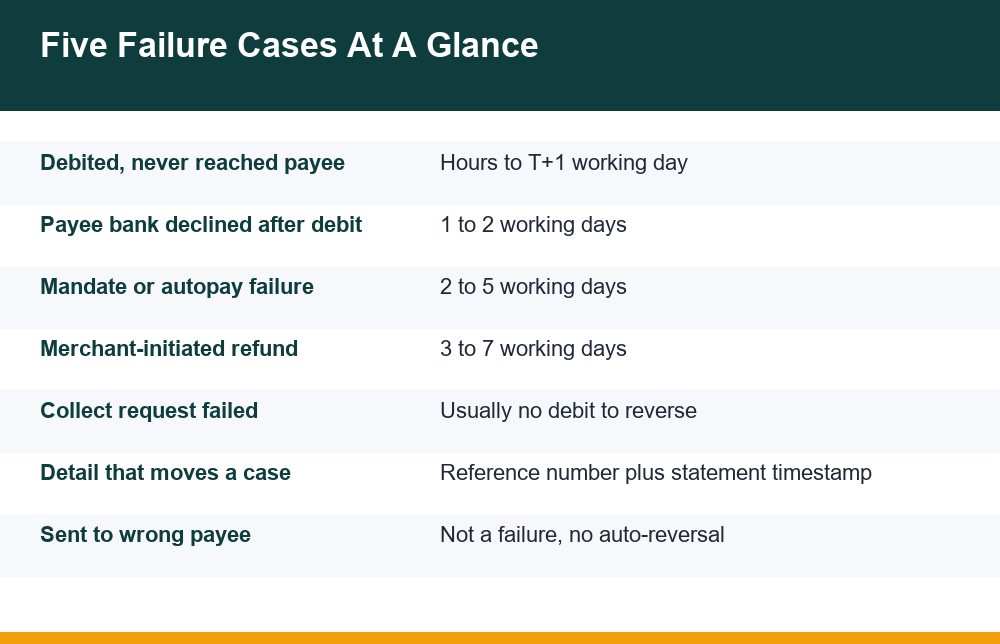
Almost every stuck transaction people describe falls into one of five shapes. Identify yours before you contact anyone — it changes the answer completely.
| Case | What actually happened | Who reverses it | Realistic wait |
|---|---|---|---|
| Debited, never reached the payee | The debit posted but the credit leg never completed | Your own bank, on detection or reconciliation | Minutes to T+1 working day |
| Payee bank declined after debit | The credit was rejected downstream and a return message was generated | Your bank, once the return lands | 1 to 2 working days |
| Mandate or autopay failure | A recurring debit was attempted and the collection broke mid-cycle | Your bank plus the biller’s provider | 2 to 5 working days |
| Merchant-initiated refund | The payment succeeded; the merchant is reversing it after a cancellation | Merchant, then its provider, then your bank | 3 to 7 working days |
| Collect request that failed | Authorisation expired or was declined, usually with no debit at all | Nothing to reverse if no debit posted | Immediate; verify the statement first |
Case one is the common one and the easiest. Your bank debited you, the far side never got credited, and your bank holds the amount in suspense until it reverses. Nothing is lost. These cases resolve on their own more often than any other, and chasing them in the first few hours achieves nothing except a ticket number.
Case two feels identical from the outside but behaves differently. The receiving bank actively declined — a closed account, a frozen credit leg, a limit breach on the payee side. The reversal cannot start until that decline message reaches your bank, which is why this one commonly spills into the following working day.
Case three is the slowest of the automatic ones. Autopay and mandate collections run on a schedule, and a failure inside the cycle may need the whole cycle to close before the amount is released. If your statement shows the debit but the biller shows nothing received, this is almost certainly what happened.
Case four is not a failure at all. The payment worked; a cancellation is being unwound. Here the bottleneck is the merchant’s own approval, and no amount of pressure on your bank will move it, because your bank has not received anything to pass on yet.
Case five is the one that wastes the most time. With a collect or request-money flow, people often see a failure screen and assume a debit occurred when none did. Check the statement. If there is no debit line, there is no refund pending, and the money never left.
Telling the five apart is mostly two checks. Does the statement show a debit at all, and does the far side show anything received? A debit with nothing received anywhere is case one or two. A debit with the wallet or biller showing nothing applied is case three. A payment the other side acknowledges, followed by a cancellation, is case four. No debit line on the statement is case five. Nearly every failed UPI payment refund question becomes answerable once those two boxes are ticked, and very few of them can be answered without doing so.
The Two Details That Make Follow-Up Work
When a case genuinely needs chasing, two pieces of information do almost all the work, and most people send neither. Everything else — screenshots, chat transcripts, order numbers — is supporting material.
- The transaction reference number. This is the long reference attached to the transfer itself, commonly twelve digits, visible in the transaction detail view in the app and usually in the narration line on your bank statement. It is the one identifier every party in the chain shares. Without it, each party can only search its own records by date and amount, which is slow and unreliable.
- The exact debit timestamp from the bank statement, not the app screen. This is the detail that separates a case that gets found from one that does not. The app shows when the app recorded the event; the statement shows when the ledger posted it. They can differ by minutes or sit either side of midnight, and a support team searches its own ledger, not your screenshot.
Alongside those two, have the amount to the paisa, the last four digits of the debited account, and the payee’s UPI address or the merchant’s order reference. Write them down once in a single note rather than re-screenshotting the app each time you are asked, because every re-telling introduces a small inconsistency and inconsistencies restart the search.
One more habit worth forming: take the statement entry, as a downloaded statement or the statement view itself, rather than the app view. A statement line is a record both you and the bank are reading from the same source. An app screenshot is a record only you can see, and it is the first thing that gets questioned.
It is equally worth knowing what not to send. Full account numbers, card numbers, a card’s expiry or security digits, and screenshots of any one-time code add nothing to a reversal case and create risk if the thread is ever seen by the wrong person. No legitimate support process needs them to locate a transaction that already has a reference number. If a form or a caller asks for them in order to “release” a reversal, that request is itself the problem, not a missing detail on your side.
App First, Then The Bank: The Order That Saves Time
The order matters because the two parties see different halves of the transaction, and going to the wrong one first produces a polite redirection and a lost day.
- Wait out the obvious window. For a simple person-to-person failure, give it the rest of the day. For anything involving a merchant or a mandate, give it the stated working days plus any weekend. Raising a ticket inside the normal window does not accelerate anything.
- Raise the query inside the app, against that specific transaction. Every major payment app has a per-transaction help path rather than a generic contact form. Use it: it attaches the reference automatically and routes to the team that can see the routing leg. Note the ticket identifier it gives you.
- Then go to the bank that debited you, through its own transaction-query channel, quoting the reference and the statement timestamp. The bank is the only party that can speak to the debit itself and to a suspense entry sitting on its books.
- Keep both references open together. If the app says the bank must reverse it and the bank says the app must confirm the failure, the two ticket numbers in one message is what breaks that loop.
- If both have gone genuinely quiet well past the window, a consumer grievance can be logged on the government’s National Consumer Helpline portal, which issues a reference number you can track.
Keep the written record short and consistent. One message containing the amount, the reference, the statement timestamp and the two ticket numbers travels further than five messages adding one detail at a time, because each new message tends to be read by whoever picks it up next rather than by the person who read the last one. Restating the same facts in the same words every time is not pedantry; it is what stops the search being started again from scratch. A failed UPI payment refund that needs a human at all is largely decided by the quality of that record.
Throughout, resist the urge to re-send the payment while the first one is unresolved. Retrying creates a second transaction with its own reference, and if the second one succeeds you now have two cases to describe instead of one. If the payment is genuinely urgent, use a different rail for the retry so the records stay cleanly separate, and say so when you follow up.
Wallet Top-Ups, Autopay And Bill Payments Take Longer
A top-up or a bill payment looks like one action and is really two. Money moves out of your bank account, and then a balance is supposed to be created or a bill marked paid on a completely separate ledger. When the first half succeeds and the second half fails, the reversal has to travel back through a system that was never designed to be watched in real time by the person waiting.
That extra ledger is the whole reason these cases run long. The wallet or biller has to confirm that it did not credit or did not apply the payment before the amount is released back. That confirmation often runs on a reconciliation cycle rather than on demand, and the cycle may be daily. Two to five working days is normal here, and it is not in itself evidence that anything is wrong.
A detail specific to wallets is worth noting: when the reversal does land, it may land as wallet balance rather than in the bank account, in cases where the balance was in fact created and then voided. That is still your money, but it is in a different place from where it left, and people reasonably report it as missing while looking at the wrong ledger. Check both before concluding that nothing came back.
There is a second trap specific to bills. A failed attempt that later reverses can sit awkwardly next to a due date, and some people pay twice to be safe and then wait for a duplicate reversal on top of the original one. If you are juggling a card bill in particular, it is worth knowing how the timing interacts with the offers attached to the payment method — our breakdown of what credit card bill payments actually earn you covers where those rewards come from and why a reversed payment can quietly undo them.
The honest advice for autopay failures is to stop treating the app as the source of truth. Check whether the biller shows the amount received. If the biller shows nothing and your statement shows a debit, the amount is in transit back to you and the biller is not the party to chase.
What If The Money Went To The Wrong UPI Number?
This is the case people search for alongside refunds, and it needs separating clearly, because it is the opposite situation. A transfer to the wrong payee is not a failed payment. It succeeded. The instruction you gave was carried out exactly, and there is no failure anywhere in the chain for a system to detect and reverse. Nothing will come back automatically, no matter how long you wait.
What you can do is raise it immediately with the app and with your bank, as a wrong-beneficiary case rather than a failure, supplying the reference and the timestamp. Your bank can contact the receiving bank, and the receiving bank can approach its own customer. But the amount is now sitting in someone else’s account, and its return depends on that person agreeing to send it back. That is the honest position, and pages that imply a guaranteed recovery are not being straight with you.
Speed matters more here than in any other case, for a plain practical reason: the money is more likely to still be sitting there on the first day than on the tenth. That is not a promise of anything, but it is the only lever available, and it argues for raising it the same day rather than waiting to see whether something reverses on its own. It will not.
Which makes prevention the only reliable control. A short pre-send checklist costs seconds:
- Read the name the app displays for the payee before confirming, not the number you typed — it is fetched from the receiving bank and it is your one independent check.
- Send one rupee first for any new payee and any large amount, and confirm receipt before sending the rest.
- Re-read the last four digits of a mobile number aloud; transposed digits are among the most common causes.
- Be suspicious of a payee address pasted from a chat message — copy-paste errors and lookalike handles both live there.
- For anything substantial, confirm the handle on a call rather than in text.
None of this is exciting, and all of it is cheaper than the alternative.
A Refund Is Not Cashback, And The Difference Matters
A large share of “my money hasn’t come back” complaints turn out not to involve a reversal at all. The amount in question is promotional — a cashback, a scratch-card reward, a promised credit tied to an offer — and it follows a completely different path with a completely different timetable. Mixing the two up guarantees that whoever you contact answers the wrong question.
The distinction is simple once you look at the statement. A refund is money of yours returning to the account it left, matching an earlier debit to the paisa. Promotional money is a new credit that never corresponded to a debit, usually arriving later, often in a wallet or as a voucher rather than the bank account, and frequently conditional on terms that were not visible at the moment of payment.
The two also behave differently when a payment is reversed. A failed UPI payment refund restores the position you were in before the attempt and owes you nothing further. Promotional money attached to that same attempt can disappear with it, because the qualifying transaction it was tied to no longer exists. People waiting on both at once often see the reversal arrive and the reward quietly never appear, and read that as one broken process rather than two working ones.
If the amount you are waiting for is promotional, the chase is a different one entirely: eligibility conditions, offer caps, the window in which the credit was supposed to post, and whether the transaction qualified in the first place. Our walkthrough of what to check when a promised cashback never arrives covers that sequence, and the companion piece on how cashback is actually funded and settled explains why those credits lag by weeks rather than days.
Worth saying plainly: a reversal is your own money coming back and it does not depend on any offer. Promotional money depends on terms. Treat them as two separate queues with two separate clocks, and both become far easier to track.
Mistakes That Quietly Delay A Refund
Most of the delay people experience is self-inflicted, and the fixes are free. A failed UPI payment refund rarely needs intervention — but it does need you not to muddy the record while it processes.
- Retrying the same payment repeatedly. Each attempt creates a new reference. Three attempts and one success means two reversals, two case numbers, and an agent trying to work out which amount you are asking about.
- Quoting the app’s time instead of the statement’s. A mismatch of a few minutes sends the search to the wrong window and the case comes back as “transaction not found”.
- Uninstalling or re-registering the payment app. You lose the in-app transaction history and the ticket thread, and re-registration can change the handle the records are tied to.
- Raising it on social media instead of in the app. It may get a reply, but the reply will ask you to use the per-transaction path anyway, and you will have published your reference number along the way.
- Chasing the bank for a merchant reversal. Until the merchant’s provider pushes it, your bank has nothing to find and no entry to show you.
- Assuming a holiday is a working day. A good share of the “it’s been three days” messages are actually one working day old.
One warning deserves its own paragraph, because it is the costliest mistake in this whole area. Searching for a “refund helpline number” surfaces numbers that are not the bank’s and not the app’s. The pattern is consistent: a confident voice offers to “process the refund immediately”, then asks you to install a screen-sharing or remote-access tool, read out a one-time code, or approve a small collect request to “verify the account”. Every one of those steps moves money away from you, not back. No genuine reversal ever requires you to approve a payment, share a one-time code, or let anyone see your screen. Reach support only through the app you paid from or a number printed on your own card or statement.
The same caution applies to anything that arrives unprompted. A message, call or link claiming to be following up on your stuck transaction, arriving before you contacted anyone, is working from the fact that stuck transactions are common rather than from any knowledge of yours. A real case you opened has a ticket number you already hold; check it in the app or the channel where you raised it, never through a link someone sent you.
Finally, keep expectations calibrated. Reversals are routine and the systems handling them are well-practised, but they are batch systems with business hours, and a quiet few days is the normal texture of the process rather than a sign of loss. Record the two details, use the right channel in the right order, and then let it work.
Frequently Asked Questions
How long does a failed UPI payment take to be refunded?
It depends on which leg failed, which is why published figures range from a few hours to five working days. A simple person-to-person failure where the credit never completed usually reverses the same day or by the next working day. A failure that needed a decline message from the receiving bank commonly takes one to two working days. Mandate and autopay failures run two to five working days, and a merchant-initiated reversal can take three to seven because the merchant’s own approval sits in the chain. Working days exclude weekends and holidays, so a Friday evening failure can look stuck for several days and still be normal.
What should I do if money was debited but the payment failed?
First, check your bank statement rather than the app screen, and confirm a debit actually posted. If it did, note the transaction reference number and the exact debit timestamp from the statement. Then wait out the normal window for your case type before doing anything else, because most reversals happen on their own. If the window passes, raise the query inside the payment app against that specific transaction, note the ticket number, and only then approach the bank that debited you with the reference and timestamp. Do not retry the payment while the first one is unresolved.
Where do I find the UPI transaction ID for a failed payment?
Open the transaction in your payment app’s history and look at the detail view, where it appears as a transaction reference or UTR, commonly a twelve-digit number. The same reference usually appears in the narration line of the entry on your bank statement or passbook, which is the better place to take it from because that is the record your bank searches. If the app shows a reference but your statement shows no matching debit, no money left your account and there is nothing pending to come back.
Does a failed payment to a merchant refund automatically?
If the payment genuinely failed, the reversal is automatic. If the payment succeeded and the merchant is unwinding it after a cancellation, that is a merchant-initiated reversal and it is not automatic in the same sense: the merchant has to confirm the cancellation before its provider pushes the money back, and only then does your bank receive it. That extra approval step is why these take three to seven working days. In that situation the merchant, not your bank, is the party who can tell you where it stands.
Why does a failed wallet top-up take longer to reverse?
Because a top-up involves two separate ledgers. Money leaves your bank account, and a balance is supposed to be created on the wallet’s own books. When the first half succeeds and the second fails, the wallet has to confirm it did not credit you before the amount is released back, and that confirmation often runs on a daily reconciliation cycle rather than on demand. Two to five working days is normal. Check whether the wallet shows the amount received, and whether the reversal landed as wallet balance rather than in your bank account, before chasing anyone.
What if the money went to the wrong UPI number?
That is not a failed payment, so nothing reverses automatically. The instruction succeeded and the money is now in another person’s account, and its return depends on that person agreeing to send it back. Raise it immediately with the app and your bank as a wrong-beneficiary case, with the reference and timestamp, so your bank can contact the receiving bank. Be realistic: recovery is not guaranteed. Prevention is the only reliable control, which means reading the payee name the app displays, sending one rupee first to any new payee, and confirming handles on a call rather than from a pasted message.
{"@context": "https://schema.org", "@type": "FAQPage", "mainEntity": [{"@type": "Question", "name": "How long does a failed UPI payment take to be refunded?", "acceptedAnswer": {"@type": "Answer", "text": "It depends on which leg failed, which is why published figures range from a few hours to five working days. A simple person-to-person failure where the credit never completed usually reverses the same day or by the next working day. A failure that needed a decline message from the receiving bank commonly takes one to two working days. Mandate and autopay failures run two to five working days, and a merchant-initiated reversal can take three to seven because the merchant's own approval sits in the chain. Working days exclude weekends and holidays, so a Friday evening failure can look stuck for several days and still be normal."}}, {"@type": "Question", "name": "What should I do if money was debited but the payment failed?", "acceptedAnswer": {"@type": "Answer", "text": "First, check your bank statement rather than the app screen, and confirm a debit actually posted. If it did, note the transaction reference number and the exact debit timestamp from the statement. Then wait out the normal window for your case type before doing anything else, because most reversals happen on their own. If the window passes, raise the query inside the payment app against that specific transaction, note the ticket number, and only then approach the bank that debited you with the reference and timestamp. Do not retry the payment while the first one is unresolved."}}, {"@type": "Question", "name": "Where do I find the UPI transaction ID for a failed payment?", "acceptedAnswer": {"@type": "Answer", "text": "Open the transaction in your payment app's history and look at the detail view, where it appears as a transaction reference or UTR, commonly a twelve-digit number. The same reference usually appears in the narration line of the entry on your bank statement or passbook, which is the better place to take it from because that is the record your bank searches. If the app shows a reference but your statement shows no matching debit, no money left your account and there is nothing pending to come back."}}, {"@type": "Question", "name": "Does a failed payment to a merchant refund automatically?", "acceptedAnswer": {"@type": "Answer", "text": "If the payment genuinely failed, the reversal is automatic. If the payment succeeded and the merchant is unwinding it after a cancellation, that is a merchant-initiated reversal and it is not automatic in the same sense: the merchant has to confirm the cancellation before its provider pushes the money back, and only then does your bank receive it. That extra approval step is why these take three to seven working days. In that situation the merchant, not your bank, is the party who can tell you where it stands."}}, {"@type": "Question", "name": "Why does a failed wallet top-up take longer to reverse?", "acceptedAnswer": {"@type": "Answer", "text": "Because a top-up involves two separate ledgers. Money leaves your bank account, and a balance is supposed to be created on the wallet's own books. When the first half succeeds and the second fails, the wallet has to confirm it did not credit you before the amount is released back, and that confirmation often runs on a daily reconciliation cycle rather than on demand. Two to five working days is normal. Check whether the wallet shows the amount received, and whether the reversal landed as wallet balance rather than in your bank account, before chasing anyone."}}, {"@type": "Question", "name": "What if the money went to the wrong UPI number?", "acceptedAnswer": {"@type": "Answer", "text": "That is not a failed payment, so nothing reverses automatically. The instruction succeeded and the money is now in another person's account, and its return depends on that person agreeing to send it back. Raise it immediately with the app and your bank as a wrong-beneficiary case, with the reference and timestamp, so your bank can contact the receiving bank. Be realistic: recovery is not guaranteed. Prevention is the only reliable control, which means reading the payee name the app displays, sending one rupee first to any new payee, and confirming handles on a call rather than from a pasted message."}}]}