Price Drop Tracking: 6 Proven Ways To Know A Discount Is Real
Price drop tracking only helps if you can read the chart. Learn the pre-sale markup pattern, baseline windows and the 6 checks that reveal a real discount.
 Madhammer
October 24, 2026 · 18 min read
Madhammer
October 24, 2026 · 18 min read
Useful price drop tracking is not about which tracker you install — it is about whether you can read the chart it shows you. Most pages on this subject are published by the trackers themselves, so they teach the buttons and skip the judgement. The judgement is the whole job. A chart can show a 40% banner discount sitting on top of a price that was quietly lifted ten days earlier, and it can show that the genuine floor for an item arrived a week before the festive event opened and never returned.
This breakdown covers what the numbers mean, how long a baseline you need, and how to work out the real amount leaving your account. No tool is named as the best one, because none of them removes the need to do the arithmetic yourself. Nothing here promises savings.
Table of Contents
Price Drop Tracking: The Short Answer
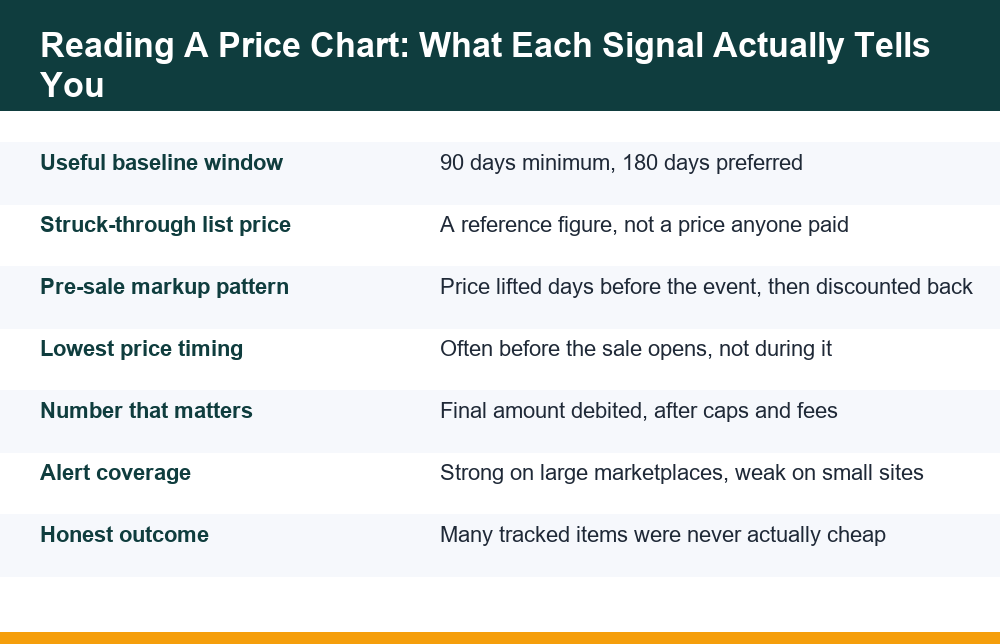
The short version: price drop tracking works when you have at least 90 days of history for the exact listing, you ignore the struck-through figure entirely, and you compare the final amount debited rather than the headline price. If any of those three conditions is missing, the chart will mislead you more often than it helps.
That is a narrower claim than the one you usually see. Trackers are often pitched as a way to never overpay again, which assumes the price history is complete, the listing is stable, and the discount structure is simple. In practice the history can be thin for newly listed variants, sellers rotate under the same product page, and the price you actually pay depends on bank offers with caps, coupon stacking rules and delivery charges that never appear on the chart.
So the honest framing is this: a price chart is evidence, not a verdict. It tells you the range a product has traded in and roughly how often it reaches the bottom of that range. It cannot tell you whether a specific offer is worth taking, because that depends on your own payment method and on costs the tracker never sees.
It also cannot tell you anything about the product. A chart is silent on build quality, on whether a newer model is weeks away, and on whether the seller behind the listing handles returns well. Those questions decide whether a purchase was good far more often than a few hundred rupees of movement on a line graph.
The rest of this breakdown is about turning that evidence into a decision — including the decision to walk away, which is the right answer far more often than any deals page will admit.
How Do I Check The Price History Of A Product?
There are four broad routes, and they differ in coverage rather than accuracy. Each one is sampling a public listing at intervals, so each one has gaps.
- In-app history on the marketplace itself. Some large Indian marketplaces now surface a short price history window — typically around 90 days — directly on the product page. It is the most authoritative source for that platform because it is the platform’s own data, but it only covers that platform, and the window is short.
- Third-party tracker sites. You paste a product URL and get a longer chart plus an alert option. Coverage is usually best for the two or three biggest marketplaces and patchy elsewhere.
- Browser extensions. These overlay a chart on the page as you shop. Convenient, but they read your browsing to do it, so check what each one collects before installing anything.
- Your own records. A note or a spreadsheet with date, listing, seller and final paid amount. Slow, but it is the only source that records what you actually paid rather than what was advertised.
A detail that catches people out: history is attached to a listing, not to a product. The same model in a different colour, storage size or seller often sits on a separate page with its own chart. If you compare the 128GB chart against the 256GB price you are about to pay, the comparison is meaningless.
Sampling frequency matters as much as window length, and it is the part no tracker advertises. A third-party service checking a page once a day will see a one-day flash price only if the check happens to fall inside it, and will miss it entirely otherwise. That means a chart showing no deep dips is not proof that none occurred — it may simply mean nobody was looking at the right moment. Treat the recorded low as the lowest price observed, not the lowest price that existed.
The practical result is that two trackers can show different lows for the same listing without either being wrong. They sampled at different times. If you are using price drop tracking to settle a decision worth a few thousand rupees, cross-check at least two sources and take the lower figure as the more complete record rather than assuming the first chart you opened is definitive.
Treat any chart with fewer than a few dozen data points as suggestive only. Thin sampling exaggerates spikes and hides short dips, which is exactly the resolution you need during a sale week.
The Pre-Sale Markup Pattern, Explained
This is the pattern that makes price drop tracking worth learning properly. In the days before a large sale event, some listings move up. The sale then launches with a discount calculated against that raised figure, so the percentage looks dramatic while the money you hand over is similar to, or higher than, what the item cost a fortnight earlier.
One published audit of 325 products across an Indian festive sale period reported that roughly 19% had been marked up shortly before the event began. The same audit noted that several items had already touched their lowest observed price before the sale opened, and never went lower at any point during it. That is a single sample rather than a universal rule, but it is the opposite of how sale weeks are usually described, and the pattern is only visible to someone who was watching beforehand.
Why it happens is less interesting than how to spot it. The signature is a flat or gently declining line, a step up within one to two weeks of the event, then a step down to a level that sits at or near the earlier baseline. On a chart this looks like a small plateau followed by a cliff — and the cliff is the part the banner advertises.
Two practical consequences follow. First, a discount percentage is only as trustworthy as the number it is calculated from, which is why percentages are the least useful figure on any product page. Second, a tracker installed on the first morning of a sale cannot show you the plateau, because it has no record of the period before it. By then the only comparison available to you is the seller’s own.
There is a milder version of the same effect that is easier to miss. Instead of a visible step up, the listing simply stops drifting down. A product that had been easing lower week by week holds steady for a fortnight, and the sale price then lands roughly where the drift would have taken it anyway. Nothing was inflated, yet the discount still represents no real gain against the trend. A longer chart shows the trend line; a two-week chart shows only the flat part.
None of this means every discount is manufactured. Genuine clearances, end-of-line stock and real competitive pressure all produce real floors, and some categories genuinely reach their cheapest point of the year during festive weeks. The point is narrower: you cannot distinguish the two cases from inside the sale, using data that only begins when the sale does.
Is The Struck-Through Original Price The Real Price?
Usually not, and it should never serve as your benchmark. The struck-through figure is typically a manufacturer’s stated list price or a seller-entered reference value. It is a number the item is compared against, not a number that was recently charged or that most buyers paid.
For a lot of electronics, apparel and home categories, that reference figure sits permanently above the trading range. The item may have spent its entire shelf life 25% to 35% below it. A listing showing “30% off” against such a figure is describing the normal price, not a drop.
You can usually confirm this yourself in under a minute. If the struck-through number has not moved in months while the selling price has moved repeatedly, it is a fixed reference rather than a record of what the item once cost. A genuine former price would have appeared on the chart as a level the listing actually traded at for some length of time.
The reliable benchmark is the one you build yourself: the lowest price the specific listing has actually reached in a window long enough to include at least one quiet period. That number is unglamorous, it produces much smaller percentages, and it is the only one that reflects what sellers have genuinely been willing to accept.
A quick mental test. Ask: “If I ignore the crossed-out number completely, is this price better than what I have seen in the last three months?” If the answer is no, the discount badge is decoration. If you cannot answer because you have no history, you are not tracking yet — you are guessing with extra steps.
How Long Before A Sale Should You Start Tracking?
Thirty days is the minimum that tells you anything. Ninety days is where your baseline starts to mean something. One hundred and eighty days is where you can recognise a seasonal pattern, and twelve months is where you can see whether a category drops reliably at particular points in the year.
The reason short windows fail is mechanical. If you begin watching two weeks before an event, the plateau described above may already be inside your window, and your “normal price” is the inflated one. Your chart will then confirm the discount as genuine. A longer window dilutes that distortion because it contains weeks the seller was not preparing for anything.
| Window | What it can show | What it still hides |
|---|---|---|
| 7–30 days | Current direction and obvious volatility | Pre-sale markups, seasonal floors, the true range |
| 90 days | A workable baseline and a credible low point | Annual cycles and festive-period behaviour |
| 180 days | Seasonal movement and repeat discount levels | Year-on-year drift as models get replaced |
| 12 months | Whether a category has predictable low periods | Nothing much — but older data ages as models change |
Window length interacts with the product, too. Fast-moving electronics are replaced often enough that a twelve-month chart may cover two generations, and the older prices stop being comparable once a successor exists. Appliances, furniture and tools change far more slowly, so a long record stays relevant and seasonal patterns are easier to trust. Match the window to how quickly the category turns over rather than always reaching for the longest chart available.
Practical approach for a planned purchase: decide in advance what you would consider a good price, start watching the exact listing three months out, and write the figure down before the marketing starts. A target you set while calm is worth more than any alert you receive while a countdown timer is running. This is the part of price drop tracking that costs nothing and does the most work.
If the purchase is urgent and you have no history, accept that honestly. Buy on what you can verify today — total cost, return window, delivery timeline — and skip the pretence that a two-week chart is telling you something.
Compare The Real Paid Price, Not The Banner Price
A chart records the listed price. It does not record the number that leaves your account. Those two figures diverge constantly in Indian online retail, and the gap is where most bad comparisons happen.
The final amount depends on several layers stacked on top of the listed price:
- Instant bank discount — applied at checkout, almost always subject to a maximum rupee cap and a minimum order value.
- Coupons or platform credit — may or may not combine with the bank offer; the rules differ by campaign.
- Delivery, installation or handling charges — sometimes waived, sometimes not, and rarely in the chart.
- Exchange or trade-in value — quoted on the listing page and revised at pickup once the device is inspected, often downward.
- Deferred value — reward points or cashback that arrive later, if conditions hold.
Those last two layers are the ones that break arithmetic. A capped instant discount and a percentage cashback can look equivalent on a banner and differ considerably at the till, which is why it is worth understanding how an instant discount differs from cashback in practice before you decide which offer is actually larger. Deferred value is worth less than immediate value by definition, and sometimes worth nothing at all — the mechanics of when and whether cashback is credited decide how much of it you ever see.
Caps are the single most common reason a comparison goes wrong. A headline offer of 10% off with a ceiling of a fixed rupee amount behaves like a percentage on small baskets and like a flat deduction on large ones, so the effective discount on an expensive item can be a fraction of the advertised figure. Work out which side of the cap your order falls on before comparing anything.
Financing is the other place a tracked price quietly grows. An offer framed as no-cost can still carry processing fees, taxes on interest components or a lost discount that was only available on full payment, so it is worth reading up on the charges that can sit inside a no-cost EMI before you treat the sticker as the total.
The working rule for honest price drop tracking: do the full addition for the exact configuration you would buy, write that single number down, and compare that against your tracked baseline. One number against one number, with the deferred portion listed separately and discounted.
6 Checks That Tell You A Discount Is Real
These six checks are the practical core of price drop tracking. They take a few minutes and they fail honestly — if a check cannot be completed, that is information too.
- Check the window length. If your history covers less than 90 days, downgrade your confidence. You are reading a fragment.
- Look for a plateau before the drop. A step up within two weeks of the event, followed by the discount, is the markup signature. Compare today’s price to the level before the step.
- Ignore the struck-through figure. Benchmark only against prices the listing has actually traded at.
- Confirm the listing matches exactly. Same variant, same capacity, same seller where that affects price. A chart for a different configuration is not evidence.
- Compute the final debited amount. Listed price, minus capped offers, plus every charge. Deferred value counted separately and discounted.
- Compare against the observed low, not the average. Then ask whether the difference is large enough to justify buying today rather than not buying at all.
A seventh check is worth mentioning even though it is not about price: the return window and the replacement terms. A marginal saving on an item you cannot send back easily is not a saving. During peak sale periods, return and pickup timelines are frequently slower than the standard policy implies, and that cost is real even though it never shows up as a rupee figure.
It helps to write the six answers down rather than running them in your head. Six quick lines in a note — window length, plateau yes or no, benchmark figure, listing match, final payable amount, gap against the observed low — take two minutes and leave you with something you can reread when the countdown timer is gone. A decision you can reconstruct afterwards is a different thing from a decision you merely felt confident about.
If the six checks come back clean and the gap is still small, the correct conclusion is that the price is ordinary. Ordinary is the most common result. A method that only ever confirms purchases is not a method.
Where Price Drop Alerts Fall Short
Alerts do not work everywhere, and the coverage gaps are predictable. Trackers rely on being able to read a public product page at intervals. Where that is hard, the data is thin or absent.
- Large marketplaces: generally well covered, with the deepest history.
- Brand-owned stores and small retailers: often partial or missing, because there is less demand to justify the scraping.
- App-only prices and logged-in prices: frequently invisible to trackers, which usually see the public web page.
- Quick-commerce and grocery: prices shift with location and stock, so a single tracked figure is close to meaningless.
- Marketplace listings with rotating sellers: the chart blends several sellers’ prices into one line.
That last group also explains a question people ask constantly: why the same product shows one price in the app and another on the website. Usually it is app-specific promotional pricing, a different seller being surfaced by the app, a coupon applied automatically in one place and not the other, or cached pricing on one surface. Location and logged-in status can both change what you are served. It is not normally an error, and the fix is simply to check both surfaces and total up each one before deciding.
Stock status is another blind spot worth knowing about. A listing can show a low price while being unavailable, out of stock for your pincode, or fulfilled only by a seller with a long delivery estimate. The chart records the number, not whether anyone could actually buy at it, so an alert can fire on a price that was never purchasable. Before you treat a recorded low as your benchmark, check whether that low coincided with real availability.
The gaps also skew what price drop tracking can tell you across a category. If the large marketplaces are well covered and everyone else is not, your chart describes competition on two or three platforms rather than the market. A smaller retailer or a brand store may have been cheaper the whole time and simply never appeared in the data.
An alert, finally, is a notification — not a recommendation. It fires when a threshold you set is crossed, which means it will happily tell you about a 2% move on a product you no longer need. Set thresholds at prices you would genuinely act on, and delete trackers for things you have stopped wanting.
Mistakes To Avoid Before You Hit Buy
Most failures in price drop tracking are not technical. They come from using a real tool to justify a decision that was already made.
- Starting to track during the sale. Your baseline is then the sale-period price, which is the one number you wanted to test.
- Treating the percentage as the metric. Percentages are derived from a reference figure you did not verify. Rupees are not.
- Letting a tracked low become a target to hit. If the chart shows the item has reached a low twice this year, that is not a reason to buy — it is a reason to know what a good price looks like.
- Counting deferred value at face value. Points, wallet credit and conditional cashback are worth less than money today, and sometimes worth nothing.
- Comparing against the average instead of the low. An average is dragged up by every week the item sat at its normal price, so a figure just under it looks like a win when it is simply typical.
- Forgetting the thing you are buying. A well-tracked purchase of something you do not need is still a loss, and no chart will flag it.
One more caution, because sale periods attract it: messages claiming a price has dropped, or that a refund or reward is pending, are a common hook for fraud. Price information you did not ask for, arriving by SMS or a messaging app with a link attached, is worth nothing regardless of how plausible the figure looks. Open the app or site yourself and check there. If you have lost money to a fake offer link or a payment request that arrived that way, the government’s National Cyber Crime Reporting Portal is where such incidents are reported, and reporting quickly matters more than reporting thoroughly.
The uncomfortable conclusion of doing this properly is that you will buy less. Reading charts honestly reveals how many advertised drops are ordinary prices in festive packaging. That is the actual return on learning this: not a stream of bargains, but a smaller number of purchases you can defend afterwards.
Frequently Asked Questions
How do I check the price history of a product?
Use the marketplace’s own in-app history if it offers one (often around a 90-day window), a third-party tracker site where you paste the product URL, a browser extension that overlays a chart, or your own notes of what you actually paid. Make sure the history belongs to the exact listing — the same variant, capacity and seller — because a different configuration usually has a separate page and a separate chart.
Are sale discounts in India real or inflated?
Both, and you cannot tell which from inside the sale. One published audit of 325 products across an Indian festive sale period reported that roughly 19% had been marked up shortly before the event, and that several items had already hit their lowest observed price before the sale opened without going lower during it. That is one sample, not a rule, and genuine clearances also exist. The only way to separate the two cases is a price record from before the marketing began.
How long before a sale should I start tracking a price?
Thirty days is the bare minimum, 90 days is where a baseline becomes credible, and 180 days lets you see seasonal movement. Starting one or two weeks out is risky because a pre-sale markup may already sit inside your window, making the inflated figure look like the normal price.
Is the struck-through original price the real price?
Usually not. It is typically a manufacturer list price or a seller-entered reference figure rather than a price recently charged. Many products trade permanently well below it, so a discount measured against that number can describe the ordinary price. Benchmark instead against the lowest price the listing has actually reached in the last three to six months.
Do price drop alerts work for all shopping sites?
No. Coverage is strongest on the largest marketplaces and weak or absent for brand-owned stores, small retailers, app-only or logged-in pricing, and quick-commerce where prices vary by location and stock. Listings with rotating sellers also blend several sellers’ prices into a single line, which makes the chart harder to read.
Why does the same product show a different price in the app and on the website?
Common causes are app-specific promotional pricing, a different seller being surfaced on each surface, a coupon applied automatically in one place but not the other, cached pricing, or your location and logged-in status changing what is served. It is not normally a mistake. Check both surfaces and total up the final payable amount on each before choosing.
{"@context": "https://schema.org", "@type": "FAQPage", "mainEntity": [{"@type": "Question", "name": "How do I check the price history of a product?", "acceptedAnswer": {"@type": "Answer", "text": "Use the marketplace's own in-app history if it offers one (often around a 90-day window), a third-party tracker site where you paste the product URL, a browser extension that overlays a chart, or your own notes of what you actually paid. Make sure the history belongs to the exact listing — the same variant, capacity and seller — because a different configuration usually has a separate page and a separate chart."}}, {"@type": "Question", "name": "Are sale discounts in India real or inflated?", "acceptedAnswer": {"@type": "Answer", "text": "Both, and you cannot tell which from inside the sale. One published audit of 325 products across an Indian festive sale period reported that roughly 19% had been marked up shortly before the event, and that several items had already hit their lowest observed price before the sale opened without going lower during it. That is one sample, not a rule, and genuine clearances also exist. The only way to separate the two cases is a price record from before the marketing began."}}, {"@type": "Question", "name": "How long before a sale should I start tracking a price?", "acceptedAnswer": {"@type": "Answer", "text": "Thirty days is the bare minimum, 90 days is where a baseline becomes credible, and 180 days lets you see seasonal movement. Starting one or two weeks out is risky because a pre-sale markup may already sit inside your window, making the inflated figure look like the normal price."}}, {"@type": "Question", "name": "Is the struck-through original price the real price?", "acceptedAnswer": {"@type": "Answer", "text": "Usually not. It is typically a manufacturer list price or a seller-entered reference figure rather than a price recently charged. Many products trade permanently well below it, so a discount measured against that number can describe the ordinary price. Benchmark instead against the lowest price the listing has actually reached in the last three to six months."}}, {"@type": "Question", "name": "Do price drop alerts work for all shopping sites?", "acceptedAnswer": {"@type": "Answer", "text": "No. Coverage is strongest on the largest marketplaces and weak or absent for brand-owned stores, small retailers, app-only or logged-in pricing, and quick-commerce where prices vary by location and stock. Listings with rotating sellers also blend several sellers' prices into a single line, which makes the chart harder to read."}}, {"@type": "Question", "name": "Why does the same product show a different price in the app and on the website?", "acceptedAnswer": {"@type": "Answer", "text": "Common causes are app-specific promotional pricing, a different seller being surfaced on each surface, a coupon applied automatically in one place but not the other, cached pricing, or your location and logged-in status changing what is served. It is not normally a mistake. Check both surfaces and total up the final payable amount on each before choosing."}}]}